1. System Information
1.1 Gracehopper
~$ lscpu
Architecture:             aarch64
  CPU op-mode(s):         64-bit
  Byte Order:             Little Endian
CPU(s):                   72
  On-line CPU(s) list:    0-71
Vendor ID:                ARM
  Model name:             Neoverse-V2


~$ hostnamectl
Operating System: Ubuntu 22.04.5 LTS
          Kernel: Linux 6.8.0-1025-nvidia-64k
    Architecture: arm64
 Hardware Vendor: Supermicro
  Hardware Model: ARS-111GL-NHR

~$ docker --version
Docker version 28.0.4, build b8034c0

~$ which docker
/usr/bin/docker

$ snap list docker
error: no matching snaps installed
1.2 Jetson
~$ hostnamectl
Operating System: Ubuntu 22.04.5 LTS
          Kernel: Linux 5.15.136-tegra
    Architecture: arm64
 Hardware Vendor: NVIDIA
  Hardware Model: NVIDIA Jetson AGX Orin Developer Kit

~$ lscpu
Architecture:            aarch64
  CPU op-mode(s):        32-bit, 64-bit
  Byte Order:            Little Endian
CPU(s):                  12
  On-line CPU(s) list:   0-11
Vendor ID:               ARM
  Model name:            Cortex-A78AE

~$ docker --version
Docker version 28.4.0, build d8eb465

~$ which docker
/usr/bin/docker

~$ snap list docker
error: no matching snaps installed
2. Building Images
2.1 Jetson
$ docker build -t my-alpine-app .
$ docker tag my-alpine-app dockerhubuser/test-alpine:jetsonV8
$ docker push dockerhubuser/test-alpine:jetsonV8
2.2 Gracehopper
$ docker build -t my-alpine-app .
$ docker tag my-alpine-app dockerhubuser/test-alpine:gracehopperNeoverseV2
$ docker push dockerhubuser/test-alpine:gracehopperNeoverseV2
Both images were built from the same simple Dockerfile shown below:
$ cat Dockerfile
FROM alpine:3.18
WORKDIR /app
COPY . /app
3. DockerHub

On Docker Hub, both images appear simply as linux/arm64, without specifying a variant.
But when I check official images such as Alpine, the variant is shown as v8.
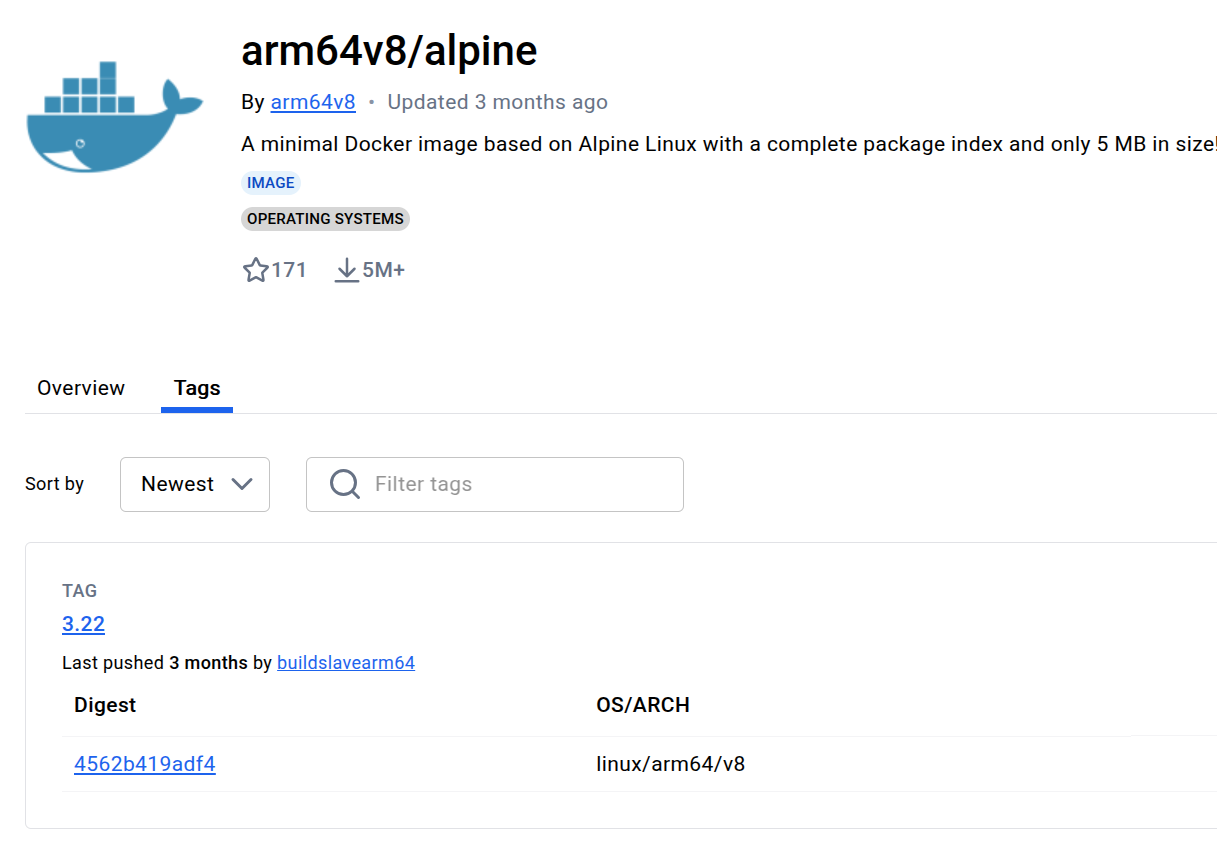
4. Questions
- Since Gracehopper uses ARMv9 (Neoverse V2), why isn’t the variant reflected (e.g.,
v9)? - Is
v8currently considered the default forarm64, andv9not yet officially recognized by Docker Hub/OCI specs?
Has anyone else run into this? Is there a way to explicitly set or detect the v9 variant when building and pushing images?
5. Multi-Architecture Build
I also experimented with a multi-architecture build targeting three platforms: amd64, Gracehopper (ARMv9), and Jetson (ARMv8).
System Information for x86-64
~$ hostnamectl
Operating System: Ubuntu 24.04.1 LTS
          Kernel: Linux 6.8.0-60-generic
    Architecture: x86-64
 Hardware Vendor: Dell Inc.

~$ lscpu
Architecture:             x86_64
  CPU op-mode(s):         32-bit, 64-bit
  Address sizes:          43 bits physical, 48 bits virtual
  Byte Order:             Little Endian
CPU(s):                   64
  On-line CPU(s) list:    0-63
Vendor ID:                AuthenticAMD
  Model name:             AMD EPYC 7282 16-Core Processor

~$ docker --version
Docker version 28.1.1, build 4eba377

~$ which docker
/usr/bin/docker

~$ docker buildx version
github.com/docker/buildx v0.23.0 28c90ea
docker buildx build --target oai-lmf --tag dockerhubuser/oai-lmf:gh-jetson --platform linux/amd64,linux/arm64/v8,linux/arm64 --file docker/Dockerfile.lmf.ubuntu --builder gh-jetson-multiarchbuilder --progress=plain --push . 2>&1 | tee LMF_log_multiarch_buildx.log
When explicitly specifying platforms like this:
--platform linux/amd64,linux/arm64/v8,linux/arm64/v9
the build ran for about 45 minutes (roughly 3× longer than the same Dockerfile on a single architecture) before failing.
If I instead use:
--platform linux/amd64,linux/arm64/v8,linux/arm64
Even though this warning appears, the build still completes and the image is pushed to Docker Hub — but without any variant being shown (only linux/arm64).
1 warning found (use docker --debug to expand):
 - Duplicate platform result requested "linux/arm64"