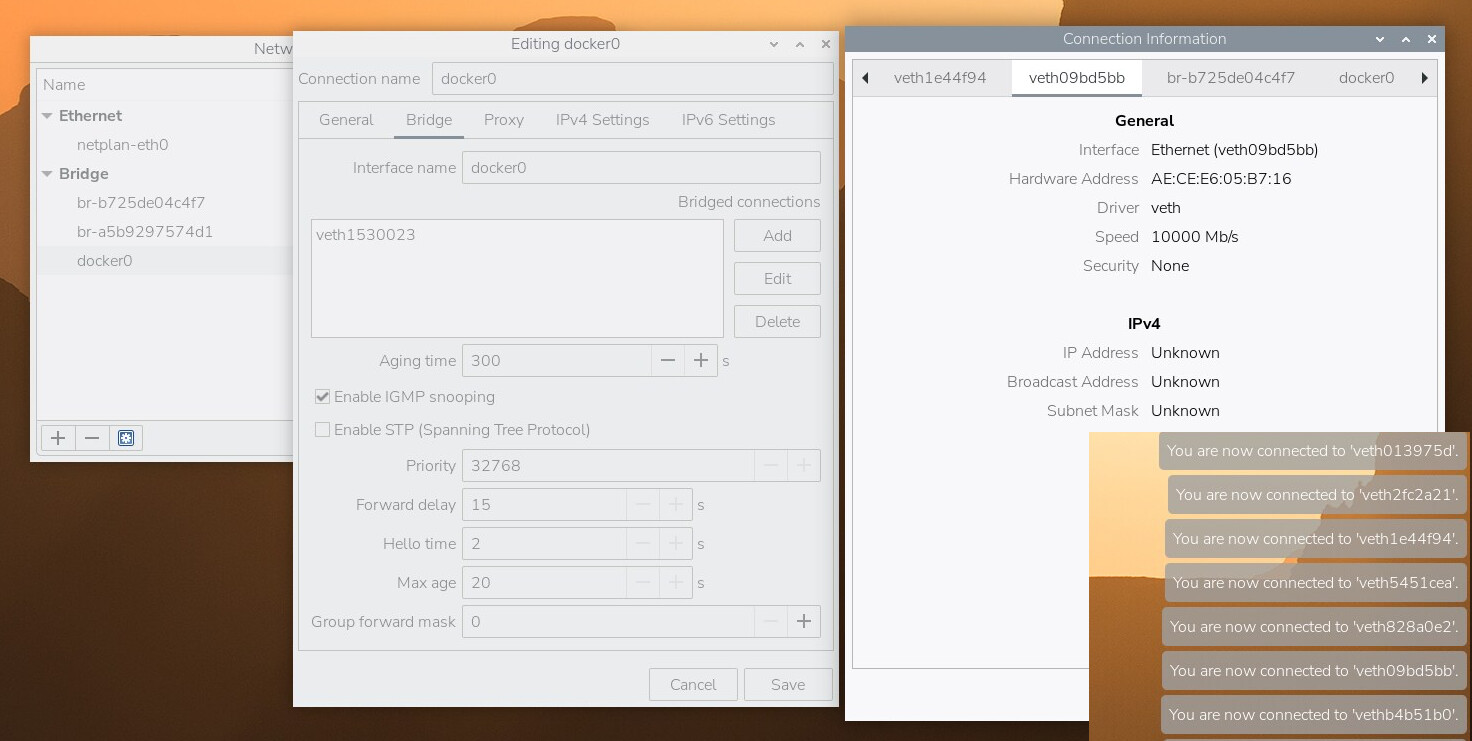
I hope someone can help me with it. I tried to search for the issue/solution and tried another forum but I didn’t get far. I even try to talk to a machine but it doesn’t helped.
Please mind that english is not my first language and I just get started with getting more into Home-Network stuff.
My system is where Docker is on:
Raspberry Pi 5 8GB
Raspberry OS Full (64Bit)
Programs running on:
Docker:
Docker Engine - Community Version: 29.3.1
Summary of docker version
API version: 1.54
Go version: go1.25.8
Git commit: c2be9cc
Built: Wed Mar 25 16:14:55 2026
OS/Arch: linux/arm64
Context: default
Server: Docker Engine - Community
Engine:
Version: 29.3.1
API version: 1.54 (minimum version 1.40)
Go version: go1.25.8
Git commit: f78c987
Built: Wed Mar 25 16:14:55 2026
OS/Arch: linux/arm64
Experimental: false
containerd:
Version: v2.2.2
GitCommit: 301b2dac98f15c27117da5c8af12118a041a31d9
runc:
Version: 1.3.4
GitCommit: v1.3.4-0-gd6d73eb8
docker-init:
Version: 0.19.0
GitCommit: de40ad0
Portainer
IMMICH
PI-Hole (also as DNS)
The Pi is connected via Ethernet to my Router Fritz!Box 7530 AX
Now my network get flooded with unknown/unused connections they looked like this:
those appear like 200 times and (all) reappearing almost immediately after deleting. All with different Names and MACs.
My PI have also a lot of (unknown/unused) veth connections.
I think Docker is causing this. Because there is also a bridge connection on the PI called Docker0. (But I am not 100% sure, maybe a configuration error of the Raspberry Pi itself?!)
But why are those (virtual?) networks are trying to communicate with my Router?
This behavior was also there before I set Pi-Hole as my DNS.
I don’t think that this is critical but it is indeed annoying and i hope to get rid of it for a better overview.
If there is a need of more information to solve this please let me know
I add some screenshot.
Please share the output of sudo docker network ls. See next post!
If only bridge driver networks are used, then what you observe shoudn’t be possible. By default, those networks are source natted, your router should not see the mac addresses of the containers. That is unless you use macvlan.
Even with macvlan I would expect to see mac addresses that follow the administrative assigned Locally administered unicast pattern: X2:XX:XX:XX:XX. Only those are supposed to be randomly or arbitrarily assigned to devices.
The pattern XE:XX:XX:XX:XX or XA:XX:XX:XX:XX:XX (The ones your network connections tab show) are reserved for administrative assigned Locally administered unicast where the mac address should be assigned by the IEEE (XA) or for use in the forthcoming IEEE P802.1CQ specification, to be assigned dynamically by the Block Address Registration and Claiming (BARC) protocol (XE).
I owned Fritz!Boxes longer than docker exist, but in the 12 years using docker, I have not once seen what you experience. Though, I have seen it freak-out with virtual ips (ucarp/keepalived).
Update: fix typos and add missing word.
Update2: strike through command and reference next post, fix typo in unicast.
I am not 100% sure if docker is causing it. I just came to that conclusion because in the network information from the RaspberryOS the docker0 bridge has a veth connection(?). And alongside i got a whole bunch of other veth networks.
I don’t know if the output from ip link show may help.
ip link show result
1: lo: <LOOPBACK,UP,LOWER_UP> mtu 65536 qdisc noqueue state UNKNOWN mode DEFAULT group default qlen 1000
    link/loopback 00:00:00:00:00:00 brd 00:00:00:00:00:00
2: eth0: <BROADCAST,MULTICAST,UP,LOWER_UP> mtu 1500 qdisc fq_codel state UP mode DEFAULT group default qlen 1000
    link/ether 88:a2:9e:6f:bf:f5 brd ff:ff:ff:ff:ff:ff
3: br-a5b9297574d1: <BROADCAST,MULTICAST,UP,LOWER_UP> mtu 1500 qdisc noqueue state UP mode DEFAULT group default
    link/ether c6:95:3b:80:32:a7 brd ff:ff:ff:ff:ff:ff
4: docker0: <BROADCAST,MULTICAST,UP,LOWER_UP> mtu 1500 qdisc noqueue state UP mode DEFAULT group default
    link/ether 02:d5:d6:e6:f5:7f brd ff:ff:ff:ff:ff:ff
11: br-b725de04c4f7: <BROADCAST,MULTICAST,UP,LOWER_UP> mtu 1500 qdisc noqueue state UP mode DEFAULT group default
    link/ether d2:34:bc:a7:73:68 brd ff:ff:ff:ff:ff:ff
26: veth09bd5bb@if2: <BROADCAST,MULTICAST,UP,LOWER_UP> mtu 1500 qdisc noqueue master br-a5b9297574d1 state UP mode DEFAULT group default
    link/ether ae:ce:e6:05:b7:16 brd ff:ff:ff:ff:ff:ff link-netnsid 0
29: veth1e44f94@if2: <BROADCAST,MULTICAST,UP,LOWER_UP> mtu 1500 qdisc noqueue master br-b725de04c4f7 state UP mode DEFAULT group default
    link/ether c2:3b:25:a2:ca:3c brd ff:ff:ff:ff:ff:ff link-netnsid 3
31: veth013975d@if2: <BROADCAST,MULTICAST,UP,LOWER_UP> mtu 1500 qdisc noqueue master br-b725de04c4f7 state UP mode DEFAULT group default
    link/ether ca:96:ac:99:57:58 brd ff:ff:ff:ff:ff:ff link-netnsid 5
34: vethb54f512@if2: <BROADCAST,MULTICAST,UP,LOWER_UP> mtu 1500 qdisc noqueue master br-b725de04c4f7 state UP mode DEFAULT group default
    link/ether 96:44:f0:d1:8c:27 brd ff:ff:ff:ff:ff:ff link-netnsid 1
35: veth72202e1@if2: <BROADCAST,MULTICAST,UP,LOWER_UP> mtu 1500 qdisc noqueue master br-b725de04c4f7 state UP mode DEFAULT group default
    link/ether 32:b7:f0:69:e7:9a brd ff:ff:ff:ff:ff:ff link-netnsid 4
37: veth1530023@if2: <BROADCAST,MULTICAST,UP,LOWER_UP> mtu 1500 qdisc noqueue master docker0 state UP mode DEFAULT group default
    link/ether 06:57:99:11:a0:d7 brd ff:ff:ff:ff:ff:ff link-netnsid 2
The veth interfaces are connected to (docker) network bridges (see: brctl show) and are used to bridge amongst the isolated network namespaces of the container and the non-isolated one of the host. Afaik, it’s required for the containers egress communication.
Though, neither the mac addresses listed in the output, nor in the ip link show command match (or even look similar) to the ones you see in your Fritz!Box.
I am afraid you are on the wrong track. I would be surprised if Docker is responsible for this behavior. If it was a known behavior, you should be able to find issues in the Moby GitHub repository, and topics in various forums.
By any chance are you running smart home devices connect to your FB, iot devices in your network, or a hypervisor with multiple vms (or lxc container) that are routed into your lan?
It is somewhat strange that you see mac addresses, but no ip addresses, or which port they are connected to. I have a couple of devices in my network that have no hostname, though they still have ips, and mac address prefixes that identifies the vendor.
Good luck in finding what creates those synthetic mac addresses.