Enviroment infos.
Hostsystem: Win11
VirtualBox with Ubuntu server vm (latest LTSC version)
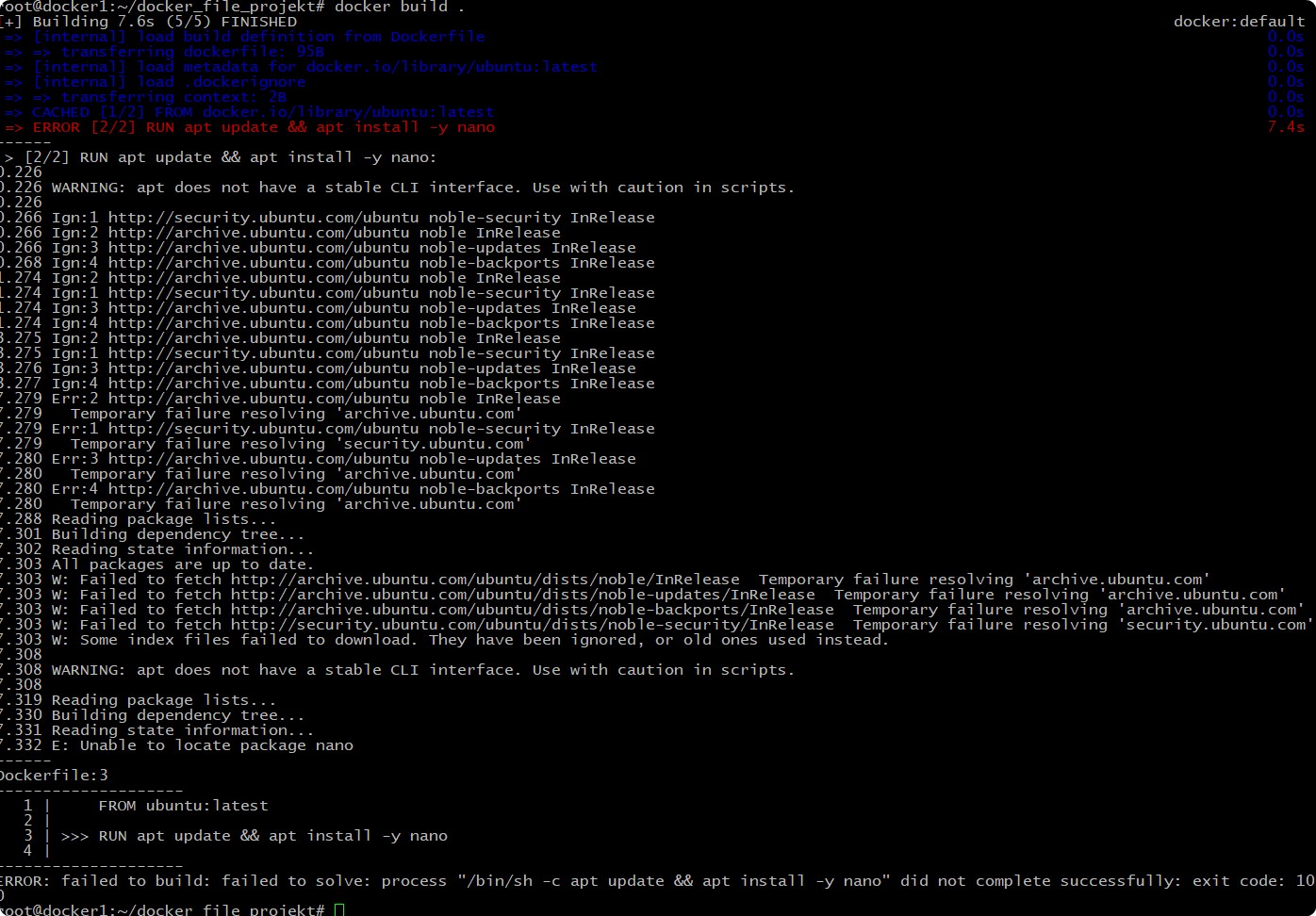
I am starting to learn Docker and i have a problem at the topc Dockerfile.
My Dockerfile contains the following:
FROM ubuntu:latest
RUN apt update && apt install -y nano
When i try to execute the command “docker build .” i got error messages. See below.
When i create and run a container manually and execute the two mentioned commands step by step then it works.
So, where is the problem ?
I tried some steps to solve that. No solution found till now.
I can’t quote text from a screenshot, but it shows the problem with the domain name. I also noticed that in some environments, the domain generated for the sources don’t work, but I haven’t seen this issue recently. I think the sources files are not even the same depending on where I run the container. I never tried to figure out, and it should be possible. When I just create a container now without running it, I get the same sources which is not the same as you get.
That difference could also be explained if your latest is not the same as my latest. You could try docker pull before running the container from the image, just to make sure you are using the most recent latest.
Types: deb
URIs: http://ports.ubuntu.com/ubuntu-ports/
Suites: noble noble-updates noble-backports
Components: main universe restricted multiverse
Signed-By: /usr/share/keyrings/ubuntu-archive-keyring.gpg

## Ubuntu security updates. Aside from URIs and Suites,
## this should mirror your choices in the previous section.
Types: deb
URIs: http://ports.ubuntu.com/ubuntu-ports/
Suites: noble-security
Components: main universe restricted multiverse
Signed-By: /usr/share/keyrings/ubuntu-archive-keyring.gpg
Which works, but not when I change the domain to what you have.
You could try saving my quoted content as ubuntu.sources and run the container this way:
docker run --rm -it -v ./ubuntu.sources:/etc/apt/sources.list.d/ubuntu.sources ubuntu:latest bash
Good advice. I mean apt search was used in the Dockerfile, but that will not return a non-zero exit code when there is no result for nano. So I assume there was no result, since the repository domains didn’t work even if the command itself did
I had a pretty long post which you haven’t replied to. I assume you missed it after the next posts, but please, try what I suggested and make sure your latest ubuntu image is really the latest since the actual tag can change and you can have an old, outdated image. Try docker pull ubuntu:latest
Where? I couldn’t find it anywhere. Image-related issues could be reported in the repository of the image. In case of the official ubuntu image, I guess here: