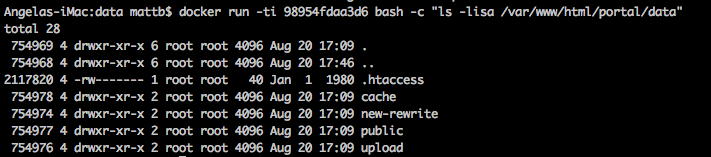
I’m currently building an image for production where I copy in the source code for my web project. In order for it to work successfully, I need to CHMOD a folder inside the container to 777.
I’ve tried dozens of variation of ENTRYPOINT scripts, but lack of knowledge and understanding are in the way.
chmod: cannot access ‘/var/www/html/wpcodes/portal/data/cache’: No such file or directory
I tried to change the user, but that didn’t help.
When I bash into the container and use the command it works as needed. I need to have the CHMOD permissions changed inside the script. Thanks for your help.
^this now depends on your build process…cannot know what is under your current directory, where the Dockerfile is. There should be a wpcodes/portal/data/cache directory otherwise it will fail.
Fair point. The URL is correct, once the copy happens the URL is correct in the container. I’ve validated this by bashing into the container and running PWD on the directory specified.
so your intermediate image is 98954fdaa3d6 as you write above in your message.
just do a docker run -ti 98954fdaa3d6 bash -c "ls -lisa /var/www/html" to see what actually has been copied. Then step by step to to modify it to the chmod you want. Once this works, you can add the bash command into your Dockerfile and it just will work.