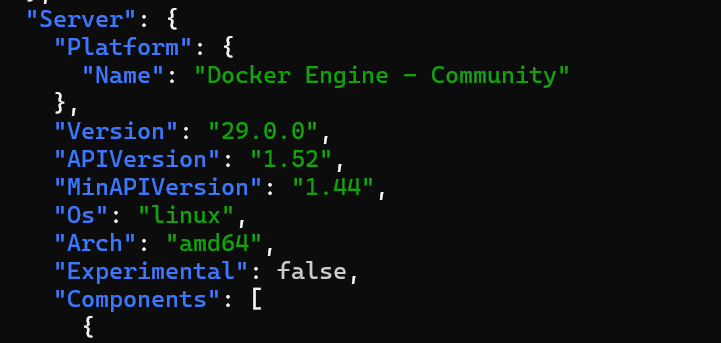
Hi, I encountered the same issue in my Laravel project. When I run my PHPUnit tests, PhpStorm IDE returns the following error:
com.github.dockerjava.api.exception.DockerException: Status 400: client version 1.24 is too old. Minimum supported API version is 1.44, please upgrade your client to a newer version. To fix it, change the project interpreter or check settings.
Please note that my Docker version was 29.0.0, with API version 1.52.
This issue also broke Portainer.
To resolve it, I had to downgrade Docker to 28.5.2 with API version 1.51.0.
Please, Docker team, address this issue as soon as possible.
Docker CE 29 is just Release Candidate at the moment, so there is still time until stable for Portainer and Traefik to support it, but I don’t know how much, since Moby 29.0.0 is already out. Even after a stable new major Docker CE is released, I would not update right away. But definitely not to RC When breaking changes are introduced, any application relying on those needs time to be updated. In case of Docker, it means anything that communicates with the Docker API or uses any Docker command.
EDIT:
I see the package as stable, but it is not mentioned in the documentation. So it is indeed releases, I was wrong.
Bro, my docker API version was 1.52, as I stated, so it was not client problem. The problem seems to be related to the docker sock connection. Which broke after docker update.
We spent hours on the same subject with a fully different context.
Java testing with Test Container in our CI with ArcRunner. During the morning the dind that is used in the arc-runner has been upgraded to 29.0.0 and broke all our runners.
Test Container is using docker-java 3.5.1 (03-2025) to connect to docker socket.
It fails with the same error message:
UnixSocketClientProviderStrategy: failed with exception BadRequestException (Status 400: {"message":"client version 1.32 is too old. Minimum supported API version is 1.44, please upgrade your client to a newer version"}
May be some fields used for the API detection are missing, but I think the ecosystem impacted by this change will be large.
The error message you shared in your first post shows that the framework used as docker client uses the api version 1.24. Is it safe to assume that this is an error thrown by the PhpStorm IDE itself?
The minimum supported api version is 1.44 now (which, btw, the error message from your first post indicates as well). It was introduced with Docker v25 on 2024-01-19 and is supported up the current v29.
It is like @bluepuma77 wrote: the client frameworks need to catch up to a supported Docker API version.
I believe the issue with their update is that they’re reporting “APIVersion” now instead of “ApiVersion”. Whole internet seems to be breaking from the change. Found the problem when our ansible installs stopped working.
How can I do with Homebrew in macos for docker version downgrading? I am using 29.0.0 but having error Error response from daemon: client version 1.52 is too new. Maximum supported API version is 1.43
It is affecting Kubernetes too. I’m not sure about newer versions, but I’m stuck on k8s version 1.20.5 (for IT reasons) and I got an error (the kubelet service failed to start due to not meeting the minimum API version) after Docker updated to 29. The solution for me was to downgrade Docker until I could find a more permanent solution.
Ubuntu command to get available Docker versions:
sudo apt-cache madison docker-ce
Example commands to downgrade Docker:
sudo apt install docker-ce=5:28.5.2-1~ubuntu.22.04~jammy
sudo apt install docker-ce-cli=5:28.5.2-1~ubuntu.22.04~jammy

# optional (if you use rootless Docker):
sudo apt install docker-ce-rootless-extras=5:28.5.2-1~ubuntu.22.04~jammy
EDIT:
If you can, it’s probably better to use the solution @meyay posted above.
OCI Images are not affected by this. The Docker Engine release v29 itself was impacted. More precisely the backend api, which doesn’t accept client that use an api version <v1.44. Neither the problem, nor the shared workarounds are related to Kubernetes.
You can try to export this variable in your terminal:
export DOCKER_API_VERSION=1.43
It should tell the client to use this specific version. You might want to add this to your ~/.zshrc (or if another shell than zsh is used: whatever rc file it uses).
 When breaking changes are introduced, any application relying on those needs time to be updated. In case of Docker, it means anything that communicates with the Docker API or uses any Docker command.